
toolbity.com

HTML Entity Encoder Decoder

Convert special characters to HTML entities and back instantly.

Live Browser Rendering Preview
Your text will render here...
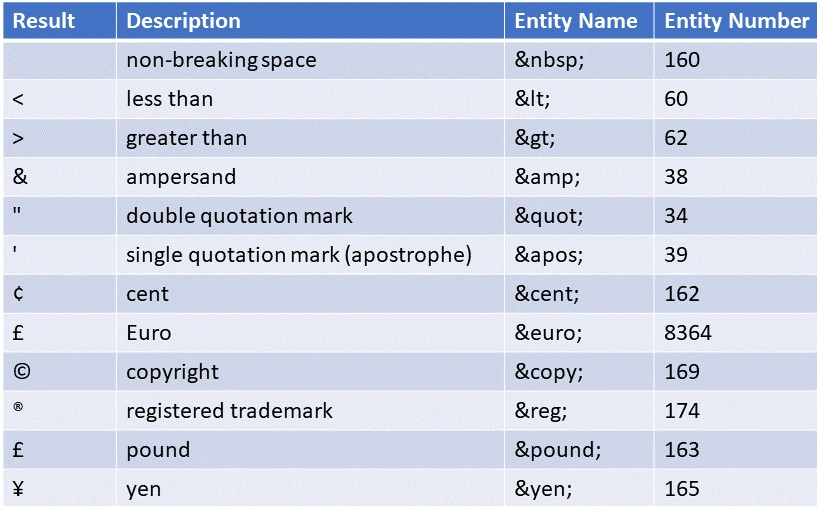
Common HTML Entities Reference

Explore our other tools

Properly sanitizing your code is just the first step in a clean workflow. To keep your project data organized, check out our JSON Formatter & Validator for debugging your API responses, or head over to our PX to REM Converter to ensure your layouts stay perfectly responsive across all devices.

JSON formatter & Validator

Beautify and validate JSON instantly with 100% client-side privacy.

PX to REM Converter

Precision PX to REM/EM conversion for responsive layouts.


How to Encode and Decode HTML Entities

Using the Toolbity HTML Entity Encoder Decoder is simple:

1. To Encode: Type or paste your plain text (like <script>) into the top box. The tool will automatically generate the encoded version (&lt;script&gt;).
2. To Decode: Paste your encoded entities into the bottom box to see the original characters.
3. Live Preview: Use the preview window at the bottom to see exactly how the character will appear on a live webpage.

Why use an HTML Entity Encoder Decoder?

1. Robust Security & XSS Prevention

The primary reason to use an HTML Entity Encoder Decoder is security. If you allow users to submit text to your site, they might include malicious <script> tags. By encoding these into entities like &lt;script&gt;, you neutralize the threat, ensuring the code is displayed as harmless text rather than being executed by the browser.

2. Perfect Code Snippet Display

Are you writing a technical blog or documentation? If you want to show HTML code on a page, the browser will try to render it. You must use an HTML Entity Encoder Decoder to convert your brackets and ampersands so they show up correctly for your readers.

3. Zero-Latency, Browser-Side Processing

Unlike other tools that send your data to a server, Toolbity’s HTML Entity Encoder Decoder works entirely within your browser.

Frequently Asked Questions

Is this HTML encoder secure?

Yes, all processing happens locally in your browser. No data is sent to our servers.

Yes, it supports all standard symbols, including currency tags and mathematical operators.

Encoding prevents browsers from misinterpreting text as actual HTML tags, which is essential for security and correct rendering.

Why Advanced Developers Choose Toolbity for HTML Encoding

In the rapidly evolving landscape of 2026 web design, maintaining a secure and standards-compliant codebase is the most effective way to ensure long-term scalability and user trust. Our HTML Entity Encoder Decoder is engineered to handle the latest character sets, including HTML5 entities, mathematical symbols, and modern Unicode characters, without compromising the underlying structure of your data.

By properly encoding reserved characters, you are directly improving your site's security posture and preventing "Content Rendering Errors"—a critical issue that can trigger browser security warnings or break your layout's accessibility. Furthermore, using an HTML Entity Encoder Decoder during regular code audits allows you to identify "Character Bloat" or improperly escaped strings that can lead to cross-site scripting (XSS) vulnerabilities.


Start using our HTML Entity Encoder Decoder to secure and polish your project today. Learn more about the official HTML5 character standards at W3C.