
An interactive Glassmorphism Generator to design sleek, frosted-glass CSS effects with real-time controls for transparency, blur, refraction, and depth.
Properly sanitizing your code is just the first step in a clean workflow. To keep your project data organized, check out our JSON Formatter & Validator for debugging your API responses, or head over to our PX to REM Converter to ensure your layouts stay perfectly responsive across all devices.
Hey everyone. If you’ve been keeping an eye on UI trends over the last year, you’ve seen "Glassmorphism" everywhere—from Apple’s visionOS to Microsoft’s Fluent Design. It’s that sleek, frosted-glass look that adds a layer of hierarchy without feeling heavy.
But let’s be real: coding it from scratch is a pain. Getting the backdrop-filter, the semi-transparent borders, and the inner refraction highlights to play nice across different browsers usually involves a lot of "guess and check."
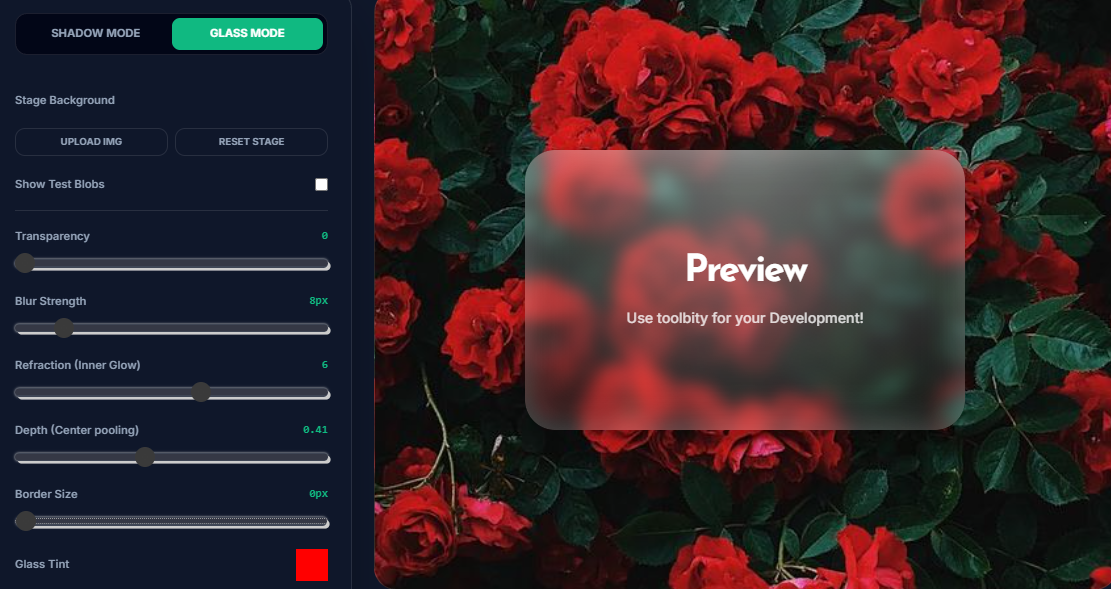
That’s why I built this Glassmorphism Generator. It’s a dedicated studio where you can tweak every variable in real-time and grab production-ready CSS.
Once you’ve used the Glassmorphism Generator to find your perfect look, implementing it is straightforward. However, there are a few technical "gotchas" you should know.
1. The Backdrop Filter
The heavy lifting is done by backdrop-filter: blur(px).
Note: For Safari support, always include the -webkit-backdrop-filter prefix. My generator does this for you automatically.
2. Handling Accessibility
Glassmorphism can be a nightmare for accessibility if not handled correctly.
Contrast: Always check that your text color has enough contrast against the glass tint.
Fallbacks: Not all browsers (looking at you, older versions of Firefox) handle blur perfectly. Always set a fallback background-color that is slightly more opaque.
3. Layering with Shadows
To make a glass card really "pop," you need a box shadow. In the Glassmorphism Generator above, try toggling between the Shadow and Glass modes to see how a subtle outer glow complements the inner refraction.
There are many tools out there, but this Glassmorphism Generator was built by developers, for developers. Most tools only give you a basic blur effect, but a true Glassmorphism Generator needs to handle the physics of light.
Integrated Refraction: Our Glassmorphism Generator includes a refraction engine to simulate how light catches the edges of a glass pane.
Realistic Depth: Use the Glassmorphism Generator to add "light pooling" via radial gradients, giving your UI a 3D feel.
Shadow & Glass Toggle: This is the only Glassmorphism Generator that lets you switch instantly to a shadow studio to perfect your element's elevation.
Is Glassmorphism good for SEO?
The design style itself doesn't impact SEO directly, but user experience (UX) and PageSpeed do. By using a Glassmorphism Generator to create lightweight CSS instead of using heavy image backgrounds, you keep your site fast and rank-ready.
Which browsers support backdrop-filter?
Most modern browsers (Chrome, Edge, Safari, Opera) support it. Firefox requires the layout.css.backdrop-filter.enabled flag in some older versions, but current versions handle it well.
How do I make the glass look "realistic"?
The secret is in the Refraction and Depth. Real glass isn't just a transparent box; it has light catching the edges. Use the sliders in the generator to add a 1px white border with low opacity to simulate that edge shine.
How does this Glassmorphism Generator handle performance?
Unlike older methods that relied on blurred images (which increased page weight), this Glassmorphism Generator uses the CSS backdrop-filter property. This is GPU-accelerated in most modern browsers, meaning the blur is rendered in real-time without slowing down your site's initial load. However, we recommend avoiding dozens of glass elements on a single page to prevent "scroll lag" on lower-end mobile devices.
Can I use this CSS tool for React or Next.js projects?
Absolutely. The code generated is standard CSS. If you are using Tailwind CSS, you can map these values to your tailwind.config.js or use arbitrary values like bg-white/10 backdrop-blur-md. For standard React components, simply paste the output into your CSS Modules or Styled Components.
How do I fix Glassmorphism not working in Firefox?
While most modern versions of Firefox support backdrop-filter by default, some users might have it disabled in their about:config settings. To ensure your UI doesn't break, always provide a "Solid Fallback."
Pro Tip: Use a background color with a slightly higher alpha (e.g., rgba(255, 255, 255, 0.8)) so that if the blur fails, the text is still legible over the background.
In the 2026 landscape of front-end engineering and design systems, the transition from static assets to functional code is a critical bottleneck. Our SVG to JSX Engineering Hub is a professional-grade utility designed to bridge the gap between raw vector data and high-performance React components. Whether you are building complex SaaS interfaces or optimizing a library of custom icons for a modern application, this tool provides a high-fidelity environment to convert any SVG to JSX with mathematical precision and production-ready safety.
While importing raw files was a standard practice for legacy workflows, "component-driven asset management" is now the requirement for scalable UI development. The SVG to JSX transformer provides a specialized client-side environment to audit your vector code, stripping away bloated XML metadata and recalculating attributes into React-compliant camelCase properties. This ensures your icons integrate seamlessly with your application logic without manual syntax corrections or runtime DOM errors.

