
Multimodal Base64 and Hex Analyst
Ultra-fast Base64, Hex, and ASCII Cross-Sync Engine. Secure, client-side data transformation.
Visual Data Analyzed
Properly sanitizing your code is just the first step in a clean workflow. To keep your project data organized, check out our JSON Formatter & Validator for debugging your API responses, or head over to our PX to REM Converter to ensure your layouts stay perfectly responsive across all devices.
In the modern development workflow, data comes in many shapes and sizes. Whether you are debugging a REST API, inspecting a JWT token, or handling binary file uploads, having a reliable Base64 and Hex Analyst is essential for maintaining data integrity. Our tool is designed to provide a seamless, all-in-one workspace for developers who need to pivot between human-readable text and machine-readable code instantly.
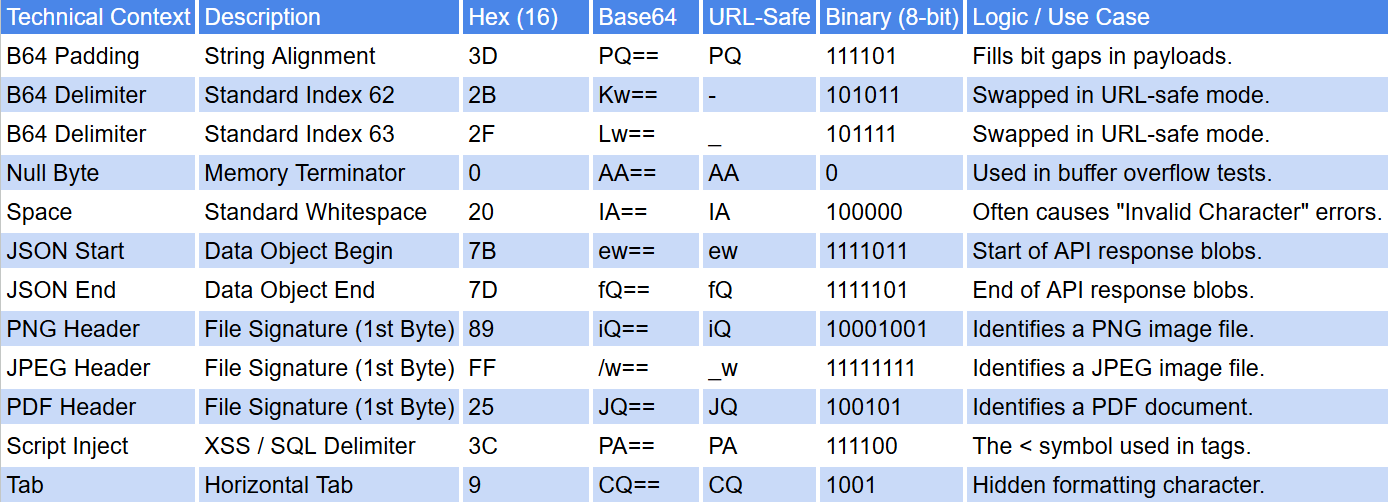
Most online converters are limited to a single transformation. However, our Base64 and Hex Analyst utilizes a synchronized "Tri-Sync" engine. This means as you input data, the tool simultaneously updates the ASCII, Base64, and Hexadecimal fields. This provides a strategic advantage when you need to:
• Validate Security Headers: Use the Base64 and Hex Analyst to inspect padding and character sets for potential data smuggling.
• Analyze Binary Payloads: Quickly convert file uploads into Hex strings to check for specific magic numbers or file signatures.
• Debug URL-Safe Strings: Toggle between standard and URL-safe Base64 (RFC 4648) to ensure your web tokens are correctly formatted.
What is the difference between Standard and URL-Safe Base64?
Standard Base64 encoding uses the + and / characters, which can cause issues when used in URLs or filenames. Our Base64 and Hex Analyst allows you to toggle URL-Safe mode (RFC 4648), which swaps these out for - and _. This is critical for generating clean JWT tokens or web-safe slugs that won't break your site's routing.
Why does my Base64 string sometimes end with "=="?
This is known as Padding. Base64 groups data into 24-bit chunks. If your input doesn't perfectly fit into those chunks, the encoder adds = characters to fill the gap. A high-quality Base64 and Hex Analyst will handle this automatically, but seeing internal padding (equal signs in the middle of a string) can be a red flag for malformed data or "padding smuggling" security risks.
Can I convert a raw image file directly to a Base64 string?
Yes. By using the upload feature in our Base64 and Hex Analyst, you can convert any image (PNG, JPG, SVG) into a Data URI. This is a popular technique for embedding small icons directly into CSS or HTML files to reduce the number of HTTP requests a browser has to make, effectively speeding up your page load times.
How is Hexadecimal different from Base64 for data analysis?
While both represent binary data, they serve different strategic purposes. Hexadecimal (Base 16) is a direct, byte-for-byte representation of data, making it the preferred format for the Base64 and Hex Analyst when inspecting file headers or memory dumps. Base64 (Base 64) is an encoding scheme designed specifically to translate binary data into a text-safe format for transmission over protocols like SMTP or HTTP.
Is it safe to decode sensitive credentials using an online tool?
Security is paramount when handling API keys or encoded passwords. Our Base64 and Hex Analyst is built with a "Privacy-First" architecture. Unlike other tools that send your data to a server for processing, our suite performs 100% of the calculations locally within your browser. Your sensitive data never leaves your device, ensuring total confidentiality.
In the 2026 landscape of web security and forensic analysis, interpreting encoded data payloads is a critical skill. Our Base64 and Hex Analyst is a professional-grade utility engineered to reverse complex serialization layers and restore total transparency to your data streams. Whether you are auditing a third-party API response for hidden signatures or debugging low-level binary transmissions, this tool provides a high-fidelity environment to analyze your source data safely and effectively.
While encoding is a standard practice for data transmission, intentional "data-masking" is often used to hide malicious payloads, mask command-and-control (C2) redirects, or obscure sensitive configuration strings. The Base64 and Hex Analyst provides a high-fidelity, client-side environment to analyze these strings, ensuring that you can audit exactly what is being sent and received before it interacts with your application logic.

