
Secure your scripts with our SRI Hash Generator before deployment. Then, debug with our JSON Formatter or perfect your layout with the PX to REM Converter.
To secure your external assets, follow these three simple steps using the Toolbity SRI Architect:
Enter the Source: Paste the URL of your CDN script (e.g., from cdnjs or jsDelivr) into the input box.
Select SHA-384: While we support SHA-256 and SHA-512, SHA-384 is the industry-recommended standard for 2026.
Deploy the Tag: Copy the generated HTML tag and replace your existing <script> or <link> tags.
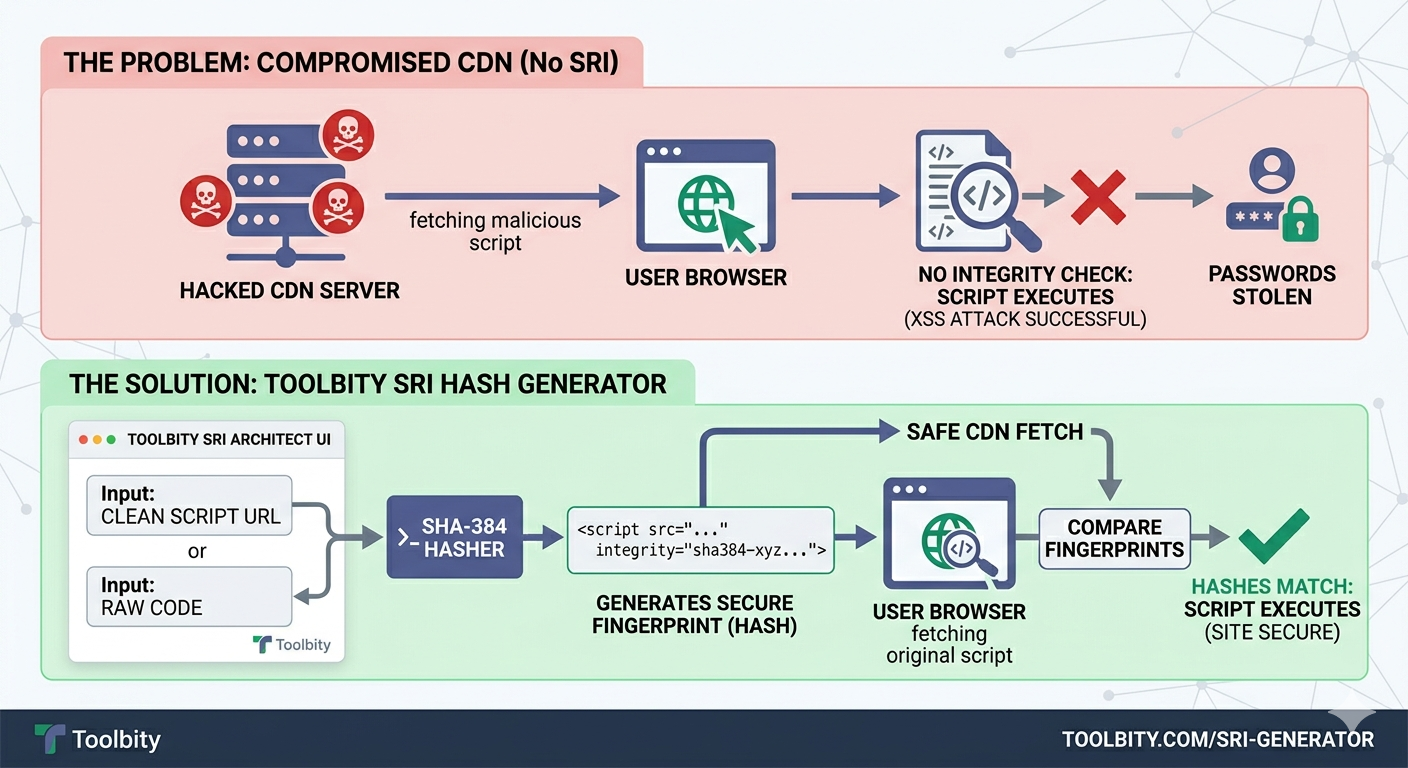
As shown in our infographic, without an SRI Hash Generator, your site is vulnerable to CDN Poisoning. If an attacker gains access to a third-party server, they can inject malicious code into a script you trust.
However, when you use our SRI Hash Generator, the browser performs a "handshake." It calculates the hash of the downloaded file and compares it to the integrity attribute you provided. If they don't match, the browser blocks the script, keeping your user data safe from XSS attacks.
Avoid 'unsafe-inline': Use our hasher or nonces instead.
Set object-src to 'none': This prevents the execution of legacy plugins like Flash.
Use base-uri 'self': This prevents attackers from changing the base URL for all relative URLs on your page.
Why is my site "Refused to execute inline script"?
This happens when you have a script inside your HTML but haven't whitelisted its hash. Use our tool's SHA-256 Hasher to generate a code snippet that tells the browser that specific script is safe
What is Report-Only Mode?
It's a "dry run" for your security. Use the Report-Only toggle in the CSP generator to see which resources would be blocked without actually breaking the site for your users.
2. Why are my Google Fonts not loading after implementing a CSP?
Google Fonts require two separate domains to function. You must add https://fonts.googleapis.com to your style-src directive and https://fonts.gstatic.com to your font-src directive. Our tool handles this automatically when you click the "Google Fonts" preset.
In the landscape of 2026 web security, maintaining a standards-compliant policy is the most effective way to ensure scalability and user trust. Our Enterprise CSP Architect handles the latest security standards, including CSP Level 3 and cryptographic hashes, without compromising application performance. However, a robust policy is only half the battle; using our [SRI Hash Generator] ensures that the resources permitted by your CSP are also cryptographically verified against tampering before they ever execute.
By properly configuring fetch directives and integrity attributes, you improve your security posture and prevent "Policy Violation Errors" that trigger browser warnings or break essential resources. Furthermore, using a professional CSP Generator alongside an SRI Hash Generator during audits allows you to eliminate "Inline Script Risks" and improperly whitelisted domains that lead to devastating cross-site scripting (XSS) and data injection vulnerabilities.
Beyond basic script blocking, this multi-layered strategy ensures compatibility with the strict requirements of modern browsers and search engine crawlers. This proactive approach to Content Security Policy and Subresource Integrity management shields your visitors from malicious injections while streamlining your workflow. By providing a single, verifiable source of truth for all external resource requests, Toolbity allows you to focus on building features while we handle the complexities of modern web defense.

