
Properly sanitizing your code is just the first step in a clean workflow. To keep your project data organized, check out our JSON Formatter & Validator for debugging your API responses, or head over to our PX to REM Converter to ensure your layouts stay perfectly responsive across all devices.
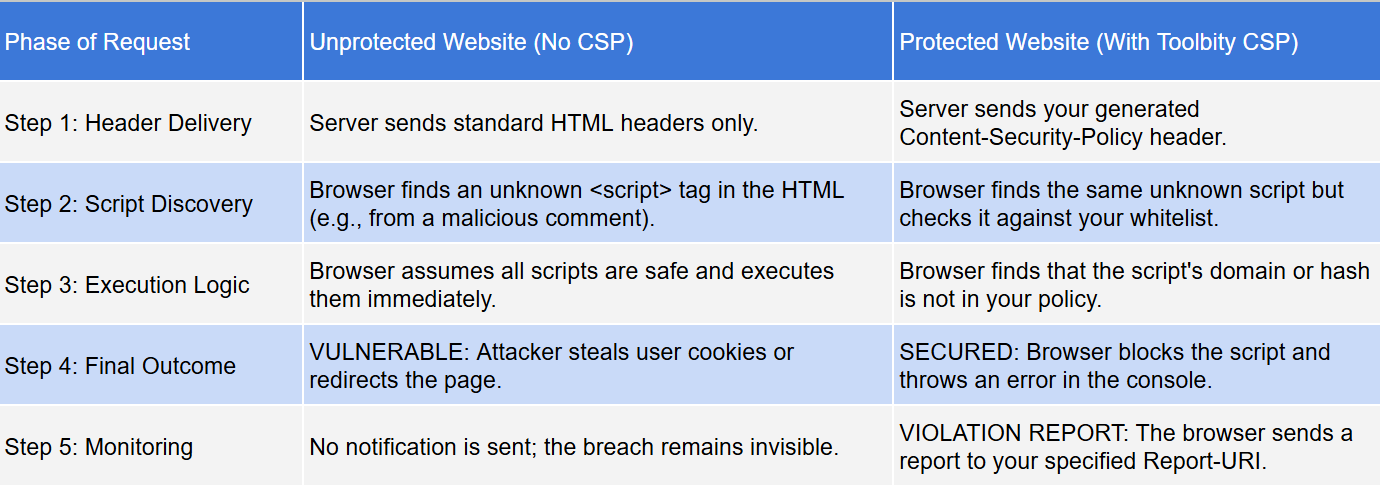
A Content Security Policy (CSP) is a critical security layer that prevents Cross-Site Scripting (XSS) and data injection. Without a proper policy, attackers can inject malicious scripts into your site, leading to data theft or defacement. Using a professional CSP Generator is the fastest way to build a robust defense without breaking your site’s functionality.
Key Features of Our CSP Architect
SHA-256 Hashing: Stop using 'unsafe-inline'. Our tool includes a built-in hasher to whitelist specific scripts securely.
One-Click Presets: Instantly add trusted domains for Google Fonts, YouTube, and Google Analytics.
Dual Output: Get the raw HTTP Header for server configs (Nginx/Apache) or the HTML Meta Tag for quick implementatio
To achieve a "High" security score in our generator, follow these rules:
Avoid 'unsafe-inline': Use our hasher or nonces instead.
Set object-src to 'none': This prevents the execution of legacy plugins like Flash.
Use base-uri 'self': This prevents attackers from changing the base URL for all relative URLs on your page.
Why is my site "Refused to execute inline script"?
This happens when you have a script inside your HTML but haven't whitelisted its hash. Use our tool's SHA-256 Hasher to generate a code snippet that tells the browser that specific script is safe
What is Report-Only Mode?
It's a "dry run" for your security. Use the Report-Only toggle in the CSP generator to see which resources would be blocked without actually breaking the site for your users.
Why are my Google Fonts not loading after implementing a CSP?
Google Fonts require two separate domains to function. You must add https://fonts.googleapis.com to your style-src directive and https://fonts.gstatic.com to your font-src directive. Our tool handles this automatically when you click the "Google Fonts" preset.
In the landscape of 2026 web security, maintaining a strictly defined and standards-compliant policy is the most effective way to ensure long-term scalability and user trust. Our Enterprise CSP Architect is engineered to handle the latest security standards, including CSP Level 3, cryptographic hashes, and modern reporting endpoints, without compromising the performance of your
application.By properly configuring fetch directives, you are directly improving your site's security posture and preventing "Policy Violation Errors"—a critical issue that can trigger browser console warnings or break your site's ability to load essential resources. Furthermore, using a professional CSP Generator during regular security audits allows you to eliminate "Inline Script Risks" or improperly whitelisted domains that can lead to devastating cross-site scripting (XSS) and data injection
vulnerabilities.Beyond basic script blocking, implementing a robust CSP Generator strategy ensures your site remains compatible with the strict requirements of modern browsers and search engine crawlers. This proactive approach to Content Security Policy management not only shields your visitors from malicious injections but also streamlines your development workflow by providing a single, verifiable source of truth for all external resource requests and cross-origin interactions.

