
Properly sanitizing your code is just the first step in a clean workflow. To keep your project data organized, check out our JSON Formatter & Validator for debugging your API responses, or head over to our PX to REM Converter to ensure your layouts stay perfectly responsive across all devices.
As developers, we’ve all been there. You find the perfect icon for your BoardingHub marketplace or a client project, but it’s a mess of raw XML, hardcoded dimensions, and stroke attributes that refuse to play nice with your CSS. You don't just want an image; you want a first-class citizen in your component tree.
That is why I built the SVG to JSX Transformer.
Efficiency is the heartbeat of modern web development. Whether you are using Next.js, Tailwind CSS, or TypeScript, manual conversion is a friction point you don't need. This tool was designed by a developer, for developers, to handle the heavy lifting of turning any SVG to JSX in a single click.
Converting SVG to JSX isn't just about changing tags; it’s about making your assets flexible. Here is how to get the most out of this transformer:
The Power of currentColor: When you convert SVG to JSX, checking the "currentColor" option allows your icons to inherit styles from your Tailwind text classes (e.g., text-emerald-500).
TypeScript Integration: For those of us building robust applications, the SVG to JSX output includes optional type definitions, ensuring your icon components are type-safe.
Dimensions Matter: By stripping hardcoded widths and heights during the SVG to JSX process, you allow your icons to be sized dynamically via CSS or parent containers.
While raw SVGs work fine in standard HTML, converting them to JSX components unlocks the full power of the React ecosystem. Here is why this workflow is a game-changer for modern web development:
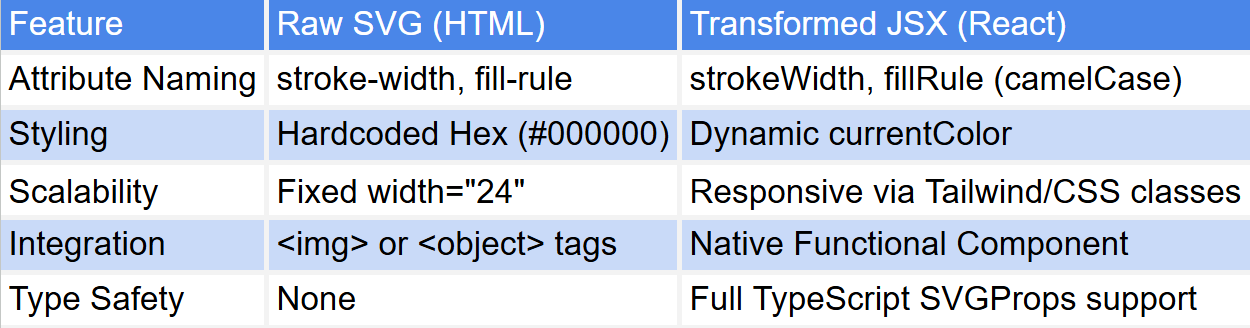
SVG to JSX conversion comparison table
1. Paste your Code: Drop your raw <svg> code into the source editor.
2. Customize the Component: Enter a unique name (e.g., HomeIcon) and toggle TypeScript or currentColor settings.
3. Audit the Result: Use the Live Inspection Stage at the bottom to verify the icon looks correct against different backgrounds.
4. Copy and Use: Hit Copy JSX and paste the optimized component directly into your React or Next.js project.
What is the difference between SVG and JSX?
Standard SVG uses XML syntax (e.g., stroke-width, class), while JSX is a syntax extension for JavaScript used by React. When you convert SVG to JSX, attributes are camelCased (e.g., strokeWidth, className) to comply with DOM property naming conventions.
Is this a viable SVGR alternative?
Yes! While SVGR is a powerful command-line tool, our SVG to JSX converter provides a zero-configuration, browser-based interface. It’s perfect for developers who want to quickly transform a single icon without setting up a build pipeline or messing with webpack configs.
How do I use the output in a Next.js project?
Once you’ve used the SVG to JSX tool:
1. Copy the generated code.
2. Create a new file (e.g., Icon.tsx) in your components folder.
3. Paste the code and export it.
4. Import it into your page and style it directly using Tailwind CSS or CSS Modules.
Why did my SVG look different after conversion?
Most conversion issues stem from nested <style> tags within the original SVG. Our SVG to JSX transformer works best with "flat" attributes. If your icon looks "broken," try running it through an optimizer like SVGO before pasting it here to strip unnecessary metadata.
Does this tool support TypeScript?
Absolutely. By toggling the TS option in the configuration bar, the SVG to JSX output will automatically include the React.SVGProps<SVGSVGElement> type definition, giving you full IntelliSense support in your IDE.
Can I convert PNG/JPG to JSX here?
While the tool is primarily an SVG to JSX transformer, we have included an experimental feature that wraps bitmap images in an SVG <image> tag. This allows you to treat your legacy assets like React components, though we always recommend using true vector SVGs for the best quality.
In the 2026 landscape of front-end engineering and design systems, the transition from static assets to functional code is a critical bottleneck. Our SVG to JSX Engineering Hub is a professional-grade utility designed to bridge the gap between raw vector data and high-performance React components. Whether you are building complex SaaS interfaces or optimizing a library of custom icons for a modern application, this tool provides a high-fidelity environment to convert any SVG to JSX with mathematical precision and production-ready safety.
While importing raw files was a standard practice for legacy workflows, "component-driven asset management" is now the requirement for scalable UI development. The SVG to JSX transformer provides a specialized client-side environment to audit your vector code, stripping away bloated XML metadata and recalculating attributes into React-compliant camelCase properties. This ensures your icons integrate seamlessly with your application logic without manual syntax corrections or runtime DOM errors.

